Meta Lead Ads make it easy for people to express interest without leaving Facebook or Instagram. That low-friction experience can generate inquiries quickly, but it also creates an operational challenge: many leads are still browsing and may forget the form soon after submitting it.
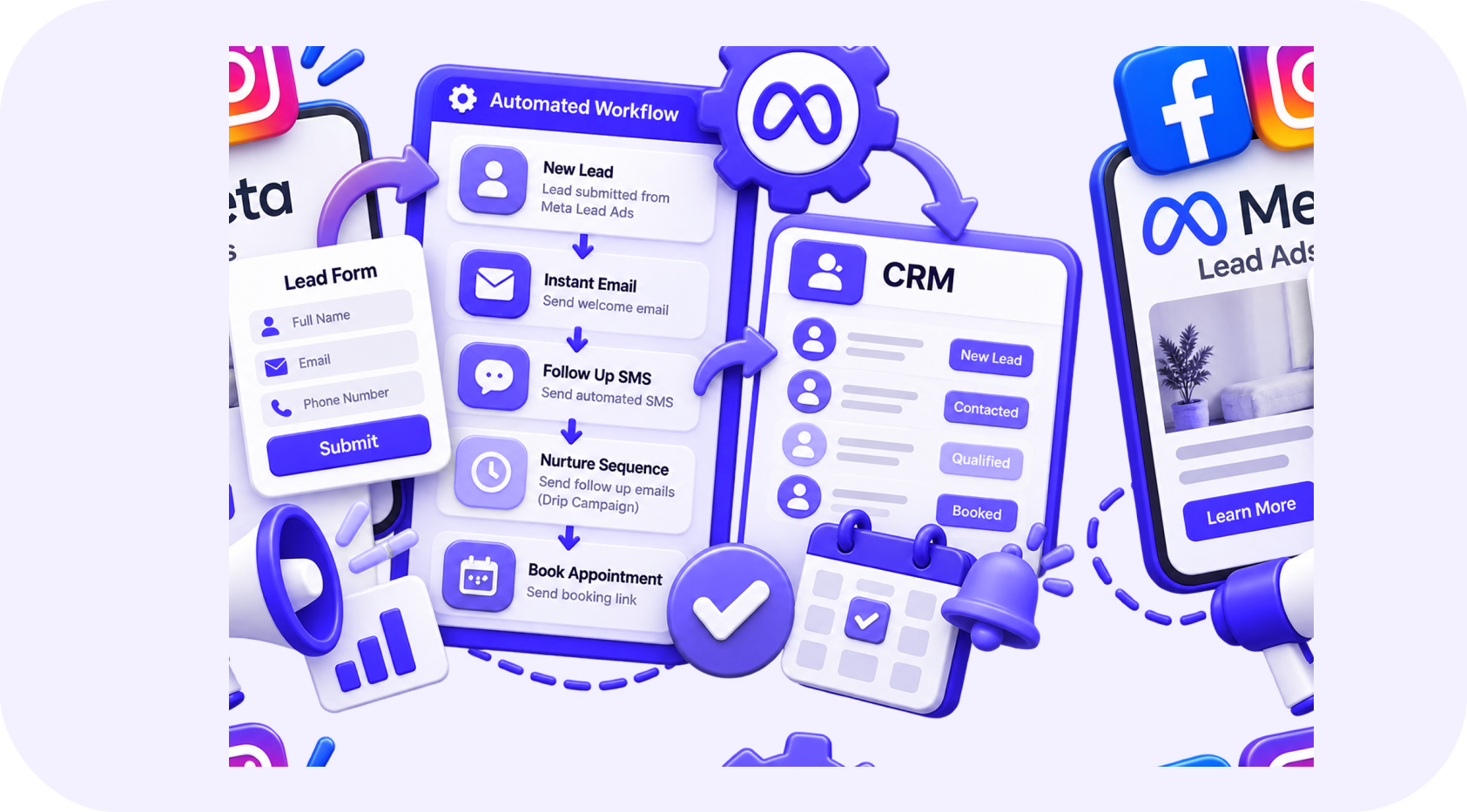
If the contact sits in Meta until someone downloads a spreadsheet, the opportunity becomes colder every minute. A connected automation can send the lead into your CRM, begin a relevant conversation, assign the right owner, and offer the correct appointment.
A fast response matters, but a fast generic response is not enough. The message must connect with the offer that produced the inquiry.
01Why Meta Leads Require a Clear Process
People using social media are not always actively searching for a provider. An attractive offer can create interest before they have fully defined their need.
That means your system must do three things well:
- Remind the person what they requested
- Confirm whether the service is a suitable match
- Make the next step easy without applying unnecessary pressure
The sales team also needs the campaign, ad, form, and answers attached to the contact record.
02The Recommended Workflow
Capture the lead automatically
Connect the Meta form directly with the CRM. Avoid relying on manual exports or personal notifications.
Preserve the source details
Store the platform, campaign, ad set, ad, form, offer, and submission time where available.
Check for an existing contact
Update the existing record carefully instead of creating duplicates that split conversation history.
Send a relevant confirmation
Mention the offer or service requested. Explain what will happen next and provide a useful response option.
Ask a small number of qualifying questions
Collect only the details required to route the lead or prepare the appointment.
Assign and notify the sales owner
Route based on location, service, availability, or another clear rule.
Offer appointment times
Send the lead to the correct calendar or allow an approved conversational assistant to help schedule.
Continue responsible follow-up
If the person does not respond, use a limited sequence across permitted channels and stop when they reply, book, or opt out.
03Improve the Lead Form
More form questions may improve qualification but reduce completion. Fewer questions can increase volume but send more weak leads to the team.
Use the form to collect information that changes what happens next. For example:
| Industry | Useful questions |
|---|---|
| Real estate | Buying or selling, location, timeline |
| Construction | Project type, site location, expected start |
| Med spa | Treatment interest, preferred location |
| B2B service | Company size, challenge, desired timeline |
Avoid requesting sensitive information through a general advertising form. Move private details into an appropriate secure process.
04Match the First Message to the Advertisement
If the ad offered a consultation, do not send a general newsletter welcome. If it promoted a specific treatment, property service, or assessment, acknowledge that interest.
A useful first message contains:
- The business name
- The offer or request
- Confirmation that the inquiry was received
- One clear question or next action
- A simple way to stop communication
Do not send several messages across every channel at the same moment. Coordinate email, SMS, calls, and internal tasks as one journey.
05Use AI for Flexible Qualification
Fixed forms cannot answer follow-up questions. A controlled AI assistant can continue the conversation, understand natural language, and ask the next approved question.
AI can help with:
- Identifying service intent
- Collecting location and timeline
- Answering approved FAQs
- Selecting the correct calendar
- Summarizing the conversation
- Escalating urgent or complex requests
It should not provide regulated advice, guarantee results, or invent pricing. Give the person a clear path to a human representative.
06Handle Unresponsive Leads Properly
Some Meta leads will not answer. That does not justify sending messages indefinitely.
A balanced sequence may include an immediate confirmation, a helpful reminder, a common-question email, and a final message asking whether the person still wants assistance. After that, move eligible contacts to lower-frequency nurturing or close the short-term opportunity.
Respect channel consent and opt-out requests across every connected system.
07Connect Marketing With Sales Results
Meta may report a submitted lead, while the CRM shows whether that lead was valid, qualified, booked, attended, and closed.
Track:
- Cost per lead
- Valid contact rate
- Speed to first response
- Contact and reply rates
- Qualified-lead rate
- Booking and show rates
- Sales conversion
- Revenue by campaign and offer
A campaign with a higher cost per lead may still be more profitable if the leads are better qualified.
08Common Automation Mistakes
- Sending all Meta leads into one generic workflow
- Losing campaign attribution during integration
- Creating a new contact for every submission
- Failing to notify a salesperson when the lead replies
- Continuing nurture messages after booking
- Using misleading personalization
- Ignoring no-show and rescheduling paths
- Measuring lead volume without measuring sales quality
09Test the Journey Before Increasing Budget
Submit a test lead from every active form. Confirm that fields map correctly, the owner receives an alert, messages use the right values, calendars work, replies pause automation, and pipeline stages update.
Repeat the test whenever the form, campaign, CRM fields, calendar, or workflow changes. A successful advertisement cannot create revenue if the system behind it is broken.
10Turn Social Interest Into a Real Conversation
Meta Lead Ads can create demand, but automation determines how efficiently that demand reaches the sales team. When the advertisement, CRM, messaging, qualification, and calendar work together, leads receive a smoother experience and management receives clearer performance data.
Written by
The InvexTech Team
We design and build AI, CRM and software systems for growing businesses, and write about what we learn doing it.